Run GbG on autopilot. Touch grass.
No clicking, no menus — same backend calls the real client makes. How Guild Battlegrounds automation actually works →
No card needed.
No clicking, no menus — same backend calls the real client makes. How Guild Battlegrounds automation actually works →
No card needed.
Hover a tab to see exactly what it does — no fluff, just what's actually in the panel.
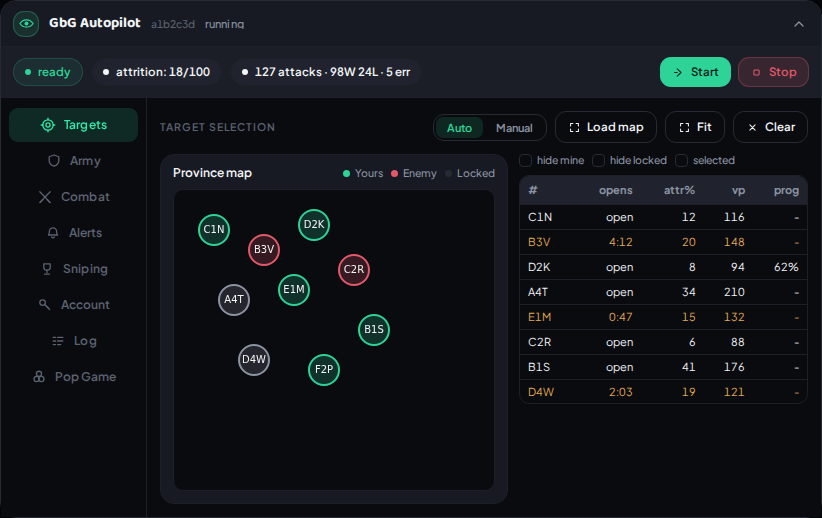
Auto mode fights your best case first — part-finished conquests, then lowest attrition, then highest VP. Or switch to Manual and pick provinces straight off the map, with a live sortable board and hide-mine / hide-locked filters.
Set your army in the game, hit Record current once, and it is applied before every attack. Every attack after that replays it against your current roster — an allow-damaged switch and a minimum-HP threshold control exactly how picky it is about full health.
Manual, Auto, or Autopilot — attack delay with jitter, tries-per-province, attrition caps, and an attack budget. Skip provinces your guild flagged ignore, or hit only the ones flagged focus. Beast mode sits behind its own switch: zero delay, maximum speed, power users only.
Drop in a Discord webhook and get pinged the instant any province locks — yours or not — with a live countdown and every participating guild's progress. Test button included so you're never guessing if it's wired up right.
Scans your Friends, Guild, and Neighborhood for other players' open Great Buildings and works out which reward slots are actually worth taking — your Arc bonus, whether the contribution locks the slot for good, and a minimum ROI you set. Snipe one by hand, run auto-snipe on the whole list, or go instant and take a slot the moment a scan finds it. FP caps and a blacklist keep it inside whatever bounds you set.
Everything the panel's done, live, right there to copy or export. If something breaks, Send report attaches your recent log automatically — no need to explain what happened, we can just see it.
Pick the buildings you want on a sector once and it places them the moment you capture one, in the order you set. It can clear what the previous owner left behind first, and finish construction instantly with diamonds — only if you switch that on.
Fights the encounters wave by wave and collects the chests between them. A small popup appears when you open GE in the game — pick your expedition army, press start. It can buy more attempts with medals if you let it, capped by how many and how much you are willing to pay.
Start or stop the bot and check live stats from your dashboard, from your phone or any browser — no need to keep the game tab open.
SentryFoE is a FoE bot — a Chrome extension for Forge of Empires automation. It concentrates on Guild Battlegrounds (GbG), handling targeting, attacking and keeping your army topped off, and also covers Guild Expedition, production collection and Great Building sniping.
Yes. Automating gameplay is against Forge of Empires' Terms of Service, and InnoGames can act on your account for it. SentryFoE is provided as-is, entirely at your own risk — see what actually gets accounts caught, or the full Terms & risk disclosure. If you're weighing this against another tool, we also compare honestly to FoE-Extender.
Auto mode fights your best case first: part-finished conquests, then lowest attrition, then highest VP. Or switch to Manual and pick provinces yourself from a live, sortable board.
Yes — the extension talks to the game's own API from inside your browser tab. Remote control and live stats from your dashboard are included, so you can start, stop, and check on it without the tab open.
It's built for Chrome (Manifest V3) and works the same way on other Chromium-based browsers like Edge or Brave.
Sign up, get a license, and build the extension straight from your dashboard — one licensed device per plan, and you can rebuild it fresh any time.